
Ective
| Device | Status | Connection to Core | Note |
|---|---|---|---|
| CSI PA Pro Series | Preview | LIN (preferred), CAN, RS485 | Inverter/charger combination, CI bus on LIN |
| (D)SC Pro Series | Preview | RS485 Modbus (preferred), CAN | MPPT solar charge controller |
| LC-S Series | Preview | CAN (preferred), RS485 | LiFePO4 battery |
| SBC Series | Planned | LIN (preferred), CAN, RS485 | Triple charger (PV, 230 V, booster) |
| LC Pro Series | Planned | - | Battery |
See the Compatible Devices overview for an explanation of the status labels.
RJ45 Pinout
Ective devices expose their wired communication interfaces (RS485, CAN, LIN) on RJ45 sockets. The pin assignment differs between device families. Ective has defined a common assignment for future devices, which the CSI PA Pro already uses. Older device families still use their own assignments.
All pins are given looking into the RJ45 socket, with the latch notch at the bottom: pin 1 is on the left, pin 8 on the right.
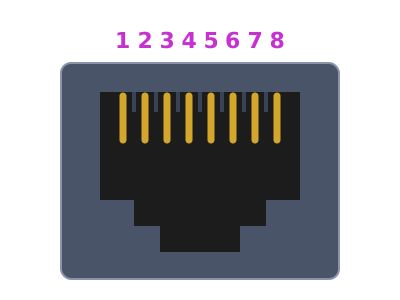
| Pin | Ective standard (CSI PA Pro) | LC-S series (batteries) | (D)SC Pro |
|---|---|---|---|
| 1 | RS485 A | RS485 A (TX) | CAN L |
| 2 | RS485 B | RS485 B (RX) | CAN H |
| 3 | GND | GND | Spare |
| 4 | LIN | CAN H | ISO_GND |
| 5 | GND (LIN) | CAN L | GND |
| 6 | GND | not connected | LIN |
| 7 | CAN H | not connected | RS485 A |
| 8 | CAN L | not connected | RS485 B |
Ective Adapter
The Ective adapter connects an Ective device with the Ective standard assignment (e.g. CSI PA Pro) to the WomoNET.core. It has an RJ45 socket for the patch cable to the device and a 6-pin Micro-Fit 3.0 header. An adapter cable splits the Micro-Fit header onto the CAN, RS485 and LIN connectors of the WomoNET.core.
Looking into the Micro-Fit header with the board at the bottom, pin 1 is on the right.
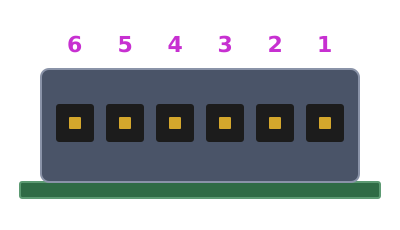
| Micro-Fit pin | Signal | RJ45 pin |
|---|---|---|
| 1 | CAN L | 8 |
| 2 | CAN H | 7 |
| 3 | LIN | 4 |
| 4 | GND | 3, 5, 6 |
| 5 | RS485 B | 2 |
| 6 | RS485 A | 1 |